Showing posts with label GNU. Show all posts

Monday, March 26, 2018

Brace expansion

Let's say I want to download the chromHMM result for all brain tissues from Roadmap project. The brain tissues are numbers from E067-E074, E081, and E082 according to Anshul's table: https://docs.google.com/spreadsheets/d/1yikGx4MsO9Ei36b64yOy9Vb6oPC5IBGlFbYEt-N6gOM/edit#gid=15

So, what's the wildcard to match all the ten brain tissues? E067-E074, E081, and E082

Here is the trick:

wget http://egg2.wustl.edu/roadmap/data/byFileType/chromhmmSegmentations/ChmmModels/coreMarks/jointModel/final/E0{{67..74},81,81}_15_coreMarks_segments.bed

There are two types of brace expansion in Bash:
1. String list: {string1,string2,...,stringN}
2. Range list: {<START>..<END>}

You can combine them or nest them, for example
{{67..74},81,81} ==> 67,68,69,70,71,72,73,74,81,82
{A..C}{0..2}  ==> A0, B0, C0, A1, B1, C1, A2, B2, C2
{{A..C},{0..2}}  ==> A, B, C, 0, 1, 2

In the new Bash 4.0, you can even do more, for example
- padding them, e.g. {0001..5} ==> 0001 0002 0003 0004 0005
- specify an increment using ranges, e.g. {1..10..2} ==> 1 3 5 7 9; {a..z..3} ==> a d g j m p s v y
- Using a prefix: 0{1..5} ==> 01 02 03 04 05
- or postfix: ---{A..E}---  ==> ---A--- ---B--- ---C--- ---D--- ---E---


Anyone understand the fun of code below:

function braceify {
    [[ $1 == +([[:digit:]]) ]] || return
    typeset -a a
    read -ra a < <(factor "$1")
    eval "echo $(printf '{$(printf ,%%.s {1..%s})}' "${a[@]:1}")"
}

printf 'eval printf "$arg"%s' "$(braceify 1000000)"

See explain here: http://wiki.bash-hackers.org/syntax/expansion/brace

Wednesday, September 24, 2014

external variables for GNU Parallel command

I was trying to use an externally defined variable within the parallel command, but it's failed. For example,


$ echo -e "intergenic\nintrons\nexons\n5utr\n3utr" | parallel 'echo {} $ANNOTATION/{}.bed'

3utr /3utr.bed
5utr /5utr.bed
intergenic /intergenic.bed
introns /introns.bed
exons /exons.bed

$ANNOTATION is not correctly read. One workout I found is to export the variable before the parallel, e.g. 

export ANNOTATION=/reference/annotation

Thursday, September 11, 2014

transpose a tab-delimited file in command line

Very often we need to transpose a tab-delimited file, e.g. rows --> columns and columns --> rows. For example, I have a SNP file like below, each row is SNP and each column is a sample:

$ cat SNP.txt
id Sam_01 Sam_02 Sam_03 Sam_04 Sam_05
Snp_01 2 0 2 0 2
Snp_02 0 1 1 2 2
Snp_03 1 0 1 0 1
Snp_04 0 1 2 2 2
Snp_05 1 1 2 1 1
Snp_06 2 2 2 1 1
Snp_07 1 1 2 2 0
Snp_08 1 0 1 0 1
Snp_09 2 1 2 2 0

I want to convert it to the following format:

id Snp_01 Snp_02 Snp_03 Snp_04 Snp_05 Snp_06 Snp_07 Snp_08 Snp_09
Sam_01 2 0 1 0 1 2 1 1 2 
Sam_02 0 1 0 1 1 2 1 0 1 
Sam_03 2 1 1 2 2 2 2 1 2 
Sam_04 0 2 0 2 1 1 2 0 2 
Sam_05 2 2 1 2 1 1 0 1 0

We can easily do this in R (e.g.. t(df)), but actually there are also a couple available tools in linux. Here are two I used:

1. rowsToCols from Jim Kent's utility
wget http://hgdownload.soe.ucsc.edu/admin/exe/linux.x86_64/rowsToCols
cat SNP.txt | rowsToCols stdin stdout

2. datamash from GNU
cat SNP.txt | datamash transpose

btw, datamash is really a neat command with many functions, like your swiss-knife for small daily tasks for data scientist. Here is its example page on GNU:
http://www.gnu.org/software/datamash/examples/

Wednesday, July 30, 2014

Unix vs. Linux

I'd love to share a nice article about the difference between Linux and Unix (Believe me, not everyone knows the difference):
http://www.cyberciti.biz/faq/what-is-the-difference-between-linux-and-unix/

From there (also from Wiki), I learned that
  • Linux is just a kernel while Unix is a complete operating system. 
  • Unix was originally developed by Dennis Ritchie (also the creator of the C programming language) and Ken Thompson from Bell lab around 1970s, while the Linux kernel was written by a Finnish CS student Linus Torvalds in 1991. 
  • A typical Linux distribution (or GNU/Linux as Free Software Foundation calls) comprises a Linux kernel, GNU tools and libraries, additional software, documentation, a window system, window manager, and a desktop environment. 
  • There are 600+ Linux distributions (or GNU/Linux), with 300+ are in active development. 
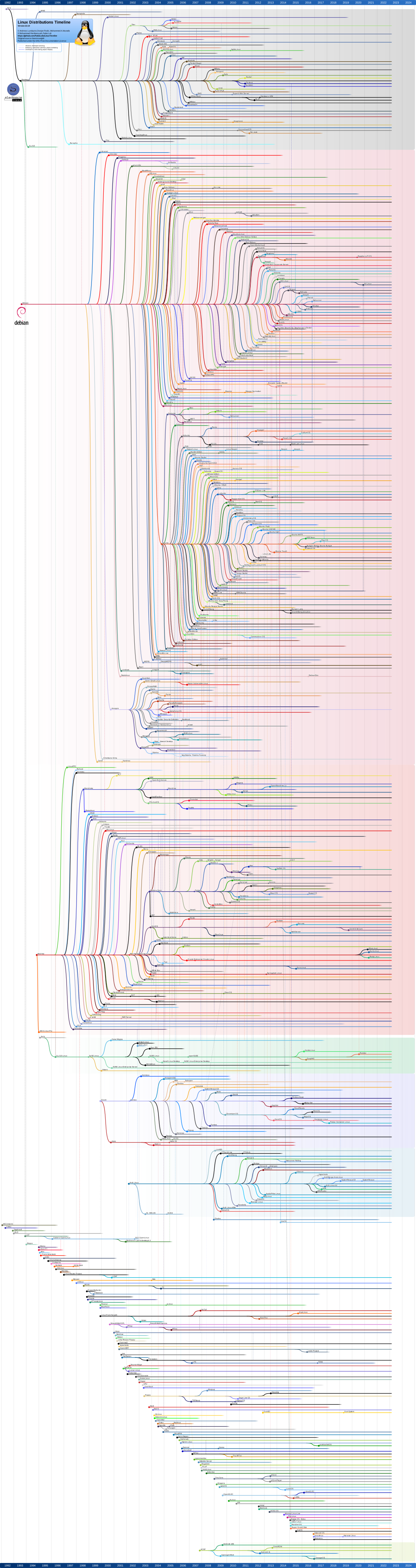
  • Some popular mainstream Linux distributions include Debian, Ubuntu, Linux Mint, Fedora, openSUSE, Arch Linux, and the commercial Red Hat Enterprise Linux and SUSE Linux Enterprise Server. Their full relationship/timeline can be referred here: http://upload.wikimedia.org/wikipedia/commons/1/1b/Linux_Distribution_Timeline.svg
  • Android is also Linux-based, but does not include a command-line interface and programs made for typical Linux distributions.
  • Mac OS is not linux-based. Its version 10, Max OS X is actually a Unix operating system. 
  • Other popular Unix systems include: HP-UX, IBM AIX, Sun Solairs, IRIX. They are based on different kernels. See details here: http://upload.wikimedia.org/wikipedia/commons/1/1b/Linux_Distribution_Timeline.svg
  • iOS is also based on Mac OS X, therefore it's also a Unix OS.

Monday, January 27, 2014

Install GNU in Mac OS

If you don't know what's GNU, check here (http://www.gnu.org/gnu/gnu.html) and here (http://en.wikipedia.org/wiki/GNU).

Why Mac OS does not come with GNU? Here is what I extracted from Hong Xu's comment:
Because OS X is mainly BSD based -- the same reason why FreeBSD/OpenBSD/NetBSD does not use GNU tools by default. Another reason that Apple bundles many outdated GNU software (bash, gdb, etc.) is that the new GPLv3 doesn't allow Apple to do so, while GPLv2 is fine with this behavior. After many GNU projects upgraded to GPL v3, Apple won't be able to bundle them any more.
I found it's very easy to install GNU in Max OS just following Hong Xu's blog:
http://www.topbug.net/blog/2013/04/14/install-and-use-gnu-command-line-tools-in-mac-os-x/

Also recommend the friendly tool of Homebrew:
http://brew.sh/

Basically, here is step:

ruby -e "$(curl -fsSL https://raw.github.com/Homebrew/homebrew/go/install)"

brew install coreutils  # contain most of what you want
brew install binutils 
brew install diffutils 
brew install ed --default-names 
brew install findutils --default-names 
brew install gawk 
brew install gnu-indent --default-names 
brew install gnu-sed --default-names 
brew install gnu-tar --default-names 
brew install gnu-which --default-names 
brew install gnutls --default-names 
brew install grep --default-names 
brew install gzip 
brew install screen 
brew install watch 
brew install wdiff --with-gettext 
brew install wget